The current Beta release is 3.1.1. which includes an updated notification process and our first VoIP calling integration (RingCentral)! All features are operational
We are excited to announce that our new mobile experience is officially in public beta! That means we think we have 90% of the app right and we are looking for feedback from our users.

This version of the app addresses a number of issues that have been creeping up as the context for mobile computing has changed (we can now assume ubiquitous connections to the internet) and we have added new integration features on the web (Microsoft and Google Contacts).
We are now allowing anyone using an iOS device who would like to try the app out to do so using this link:
https://testflight.apple.com/join/o7IEB5cn
This page describes the steps you can take to test the most recent Beta version of the new mobile app. Beta software refers to software that is still in active development, maybe not even fully functional, but ready for users to use as a test. At this point, we are nearly finished with the this version and we expect to make it the default Production version of the app very soon.

The steps to start using the new CallPlease app:
- Download and install Apples Test Flight application
- Access the CallPlease app inside of Test Flight and load it on your iOS device.
The Beta application uses the same databases as the current app, so you can seamlessly move back and forth between the current app and the Beta app without losing or missing any of your call data or contacts.
We’ve designed the new app to be easy for current users to transition to the new app.
We do have to explain the new contact feature.
Use your CallPlease Web contacts on the mobile app!
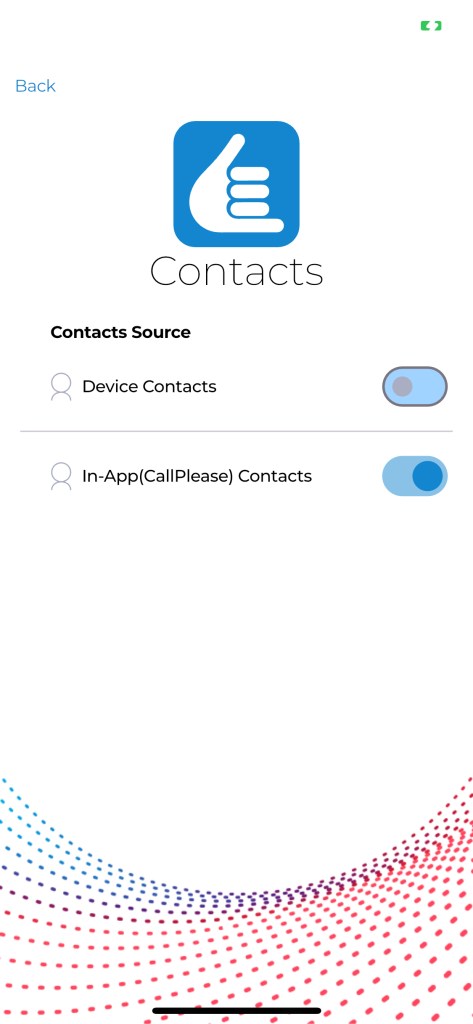
CallPlease App 3.0 allows users of the app to connect to the contact database they use on the CallPlease webapp. That includes the CallPlease contacts, integrated contacts from Google or Microsoft, Department contacts and global contacts.
Just like the web app, the new mobile app requires that you type three characters to initiate a search. The more characters you add, the more narrow the search.
This will be particularly useful to Assistants as the previous mobile app has been almost worthless up until now. Assistants now have access to the Address Books of their Executives in the mobile app – just like on the web.
Use the Contacts setting to switch between Device Contacts (the old way) and In-App (CallPlease) Contacts from the webapp.
We invite you to give the new app a try and give your feedback.
 CallPlease Learning Center
[…] release version is 3.0.0 – Bug fixes will be posted every 7 to 10 days. You can join the Public Beta release to receive more frequent […]
LikeLike